

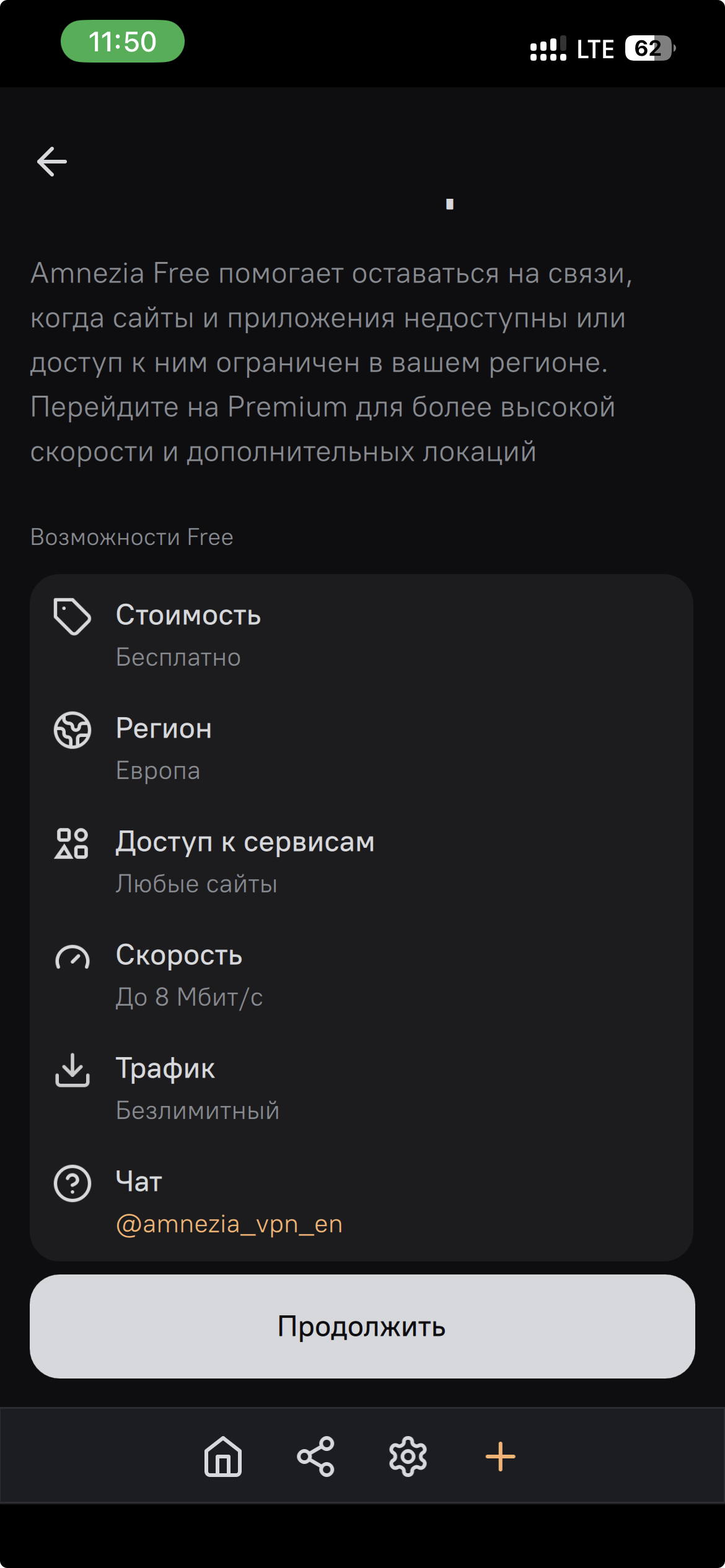
The screenshot shows Free Europe with access to any site, speeds of up to 8 Mbps and unlimited traffic. Other regional Free options may have different restrictions.
For a comparison with Geodema, see the VPN without registration page. For video access and regional limits, see the YouTube guide.
Connect through the app
- Install AmneziaVPN
Download the app from Amnezia’s official page. Avoid random APK sites.
- Add a connection
Launch the app. Tap “Let’s get started” or the add-connection button.
- Choose VPN by Amnezia
Open the Free options and choose Europe when it is available in your app version.
- Allow VPN access and connect
Accept the system VPN permission request. Then tap or click Connect.
Free and Premium are different products
Free Europe is the free option in the screenshot. Premium is a separate paid subscription with more locations.
If the connection does not work
- Disconnect any other active VPN connection.
- Update the app and create the Free connection again.
- If it fails only on mobile data, check whether your carrier is applying whitelist restrictions.
- If the problem persists, consult Amnezia’s documentation or contact support.
Why can a site see my real IP with another regional Free option?
Other regional Amnezia Free options may route only selected resources through the VPN. Other sites then use your regular connection and see your real IP. The Free Europe option in the screenshot lists access to any site. Check which regional option is selected in your app and the terms shown for it.